> ## Documentation Index
> Fetch the complete documentation index at: https://docs.literalai.com/llms.txt
> Use this file to discover all available pages before exploring further.
# Llama Index
The Llama Index integration enables to monitor your RAG pipelines with a single line of code:
```python LlamaIndex instrumentation theme={null}
literalai_client.instrument_llamaindex()
```
The Llama Index integration already support LLM tracing. You should not use it in conjunction
with other LLM provider integrations such as [OpenAI](/integrations/openai).
The Llama Index integration in the Python SDK is compatible with Llama Index starting with version 0.10.58.
LlamaIndex offers a variety of concepts to interact with LLMs:
* Query Engines
* LLMs
* Agents
We explain what each concept leads to in terms of `Thread`, `Run` and `Generation` logs,
and show you a visual of what you can expect on Literal AI.
# Query Engines
```python Python theme={null}
from literalai import LiteralClient
from llama_index.core import Document, VectorStoreIndex
client = LiteralClient()
# The magic happens here
client.instrument_llamaindex()
index = VectorStoreIndex.from_documents([Document.example()])
query_engine = index.as_query_engine()
# Here we are outside of a thread so the integration will create one for us
query_engine.query("Tell me about LLMs")
# If we call LlamaIndex from inside a context, the integration will use it
with client.thread(name="Test LlamaIndex Thread") as thread:
query_engine.query("Tell me about LLMs")
# If we make several calls inside the context, they will all be logged in the same thread
with client.thread(name="LlamaIndex Questions") as thread:
query_engine.query("Tell me about LLMs")
query_engine.query("What is RAG ?")
# Optional: make sure to flush the events before stopping the client
client.flush_and_stop()
```
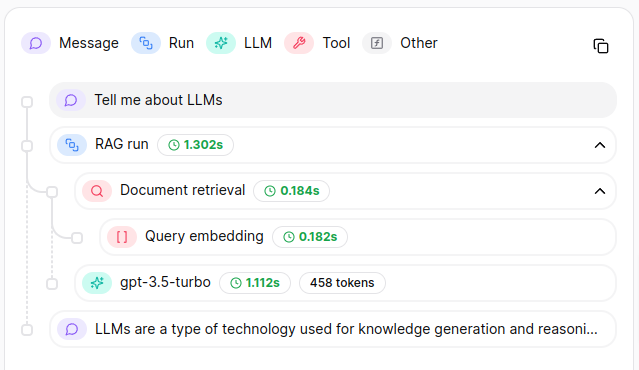
Each `Thread` will result in the following tree on Literal AI :
 # LLMs
LlamaIndex offers wrappers around LLM providers to interact with their APIs.
### `llm.chat`
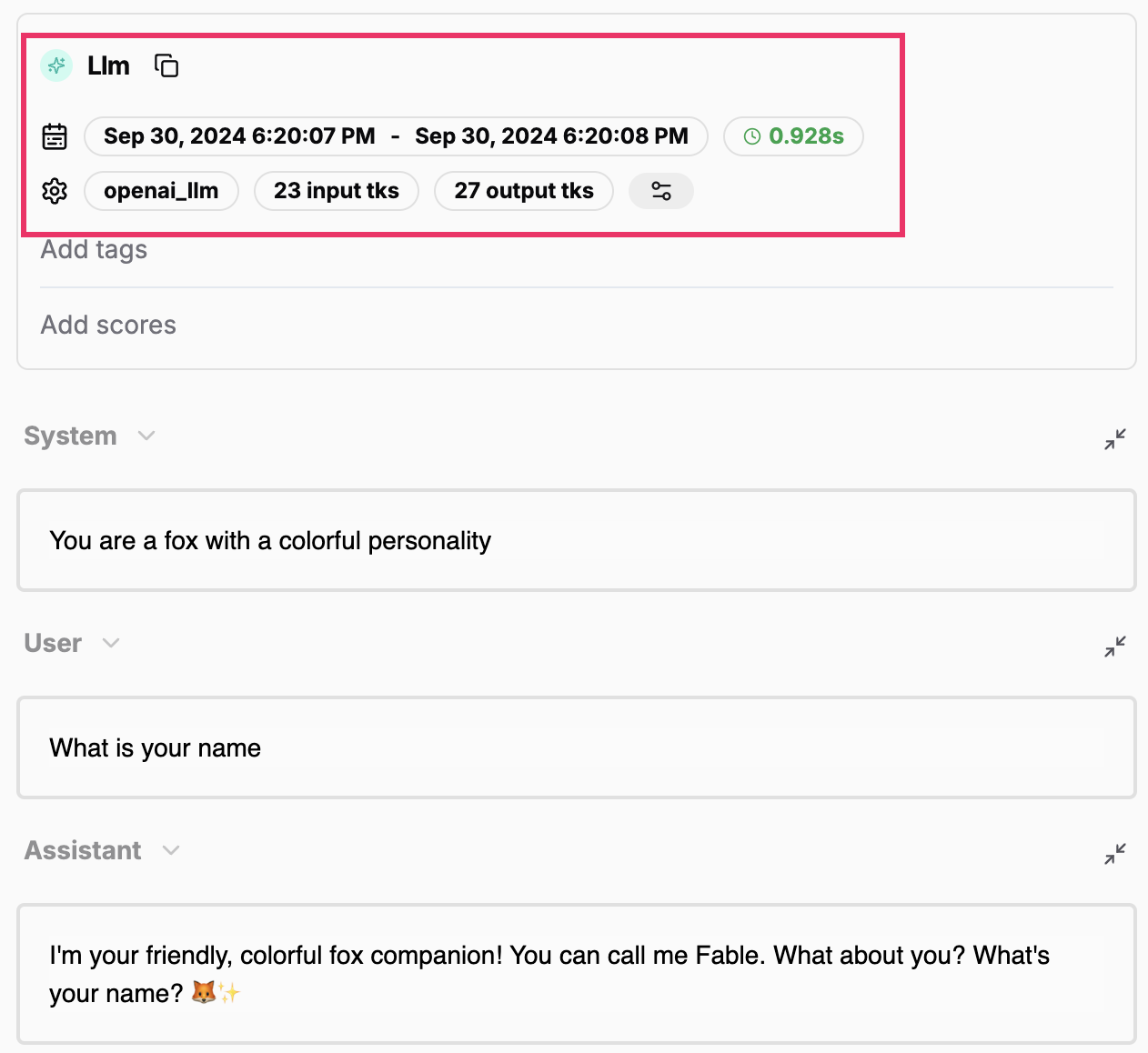
The methods `llm.chat` and `llm.stream_chat` both generate a standalone `Generation`:
# LLMs
LlamaIndex offers wrappers around LLM providers to interact with their APIs.
### `llm.chat`
The methods `llm.chat` and `llm.stream_chat` both generate a standalone `Generation`:
 Please note that LlamaIndex token usage is not available for streaming methods due to limitations
in the event data present on the `LLMChatEndEvent` for chunk completions.
However, the Literal AI platform defaults token counts computation to the `cl100k_base` tokenizer
which is a fair approximation of the expected token usage.
### `llm.predict_and_call`
The `llm.predict_and_call` also results in a standalone `Generation` on the Literal AI platform.
Specifically, LlamaIndex does not trigger events related to tool calls and we recommend decorating
your tools' function definitions with `@literalai_client.step(type="tool", name="My Tool")` to view
the calls performed.
Note that a `Step` of type `tool` cannot be standalone on the Literal AI platform and we thus
recommend you to add a contextual `Step` wrapper around your `llm.predict_and_call` call, as such:
```python LlamaIndex llm.predict_and_call theme={null}
with literalai_client.step(type="run", name="Predict & Call")
llm.predict_and_call(...)
```
# Agents
LlamaIndex has the concept of agent as part of its `FunctionCallingAgent` and specifically derived
an `OpenAIAgent` with specificities to the OpenAI model offerings.
Function calling agents can be tuned in a variety of ways, but the general idea is that they iteratively
perform the configured LLM calls with tool options until the LLM deems it unnecessary to call a tool.
When calling an `agent.chat`, you can expect to obtain a "run" `Step` of the following form:
Please note that LlamaIndex token usage is not available for streaming methods due to limitations
in the event data present on the `LLMChatEndEvent` for chunk completions.
However, the Literal AI platform defaults token counts computation to the `cl100k_base` tokenizer
which is a fair approximation of the expected token usage.
### `llm.predict_and_call`
The `llm.predict_and_call` also results in a standalone `Generation` on the Literal AI platform.
Specifically, LlamaIndex does not trigger events related to tool calls and we recommend decorating
your tools' function definitions with `@literalai_client.step(type="tool", name="My Tool")` to view
the calls performed.
Note that a `Step` of type `tool` cannot be standalone on the Literal AI platform and we thus
recommend you to add a contextual `Step` wrapper around your `llm.predict_and_call` call, as such:
```python LlamaIndex llm.predict_and_call theme={null}
with literalai_client.step(type="run", name="Predict & Call")
llm.predict_and_call(...)
```
# Agents
LlamaIndex has the concept of agent as part of its `FunctionCallingAgent` and specifically derived
an `OpenAIAgent` with specificities to the OpenAI model offerings.
Function calling agents can be tuned in a variety of ways, but the general idea is that they iteratively
perform the configured LLM calls with tool options until the LLM deems it unnecessary to call a tool.
When calling an `agent.chat`, you can expect to obtain a "run" `Step` of the following form:
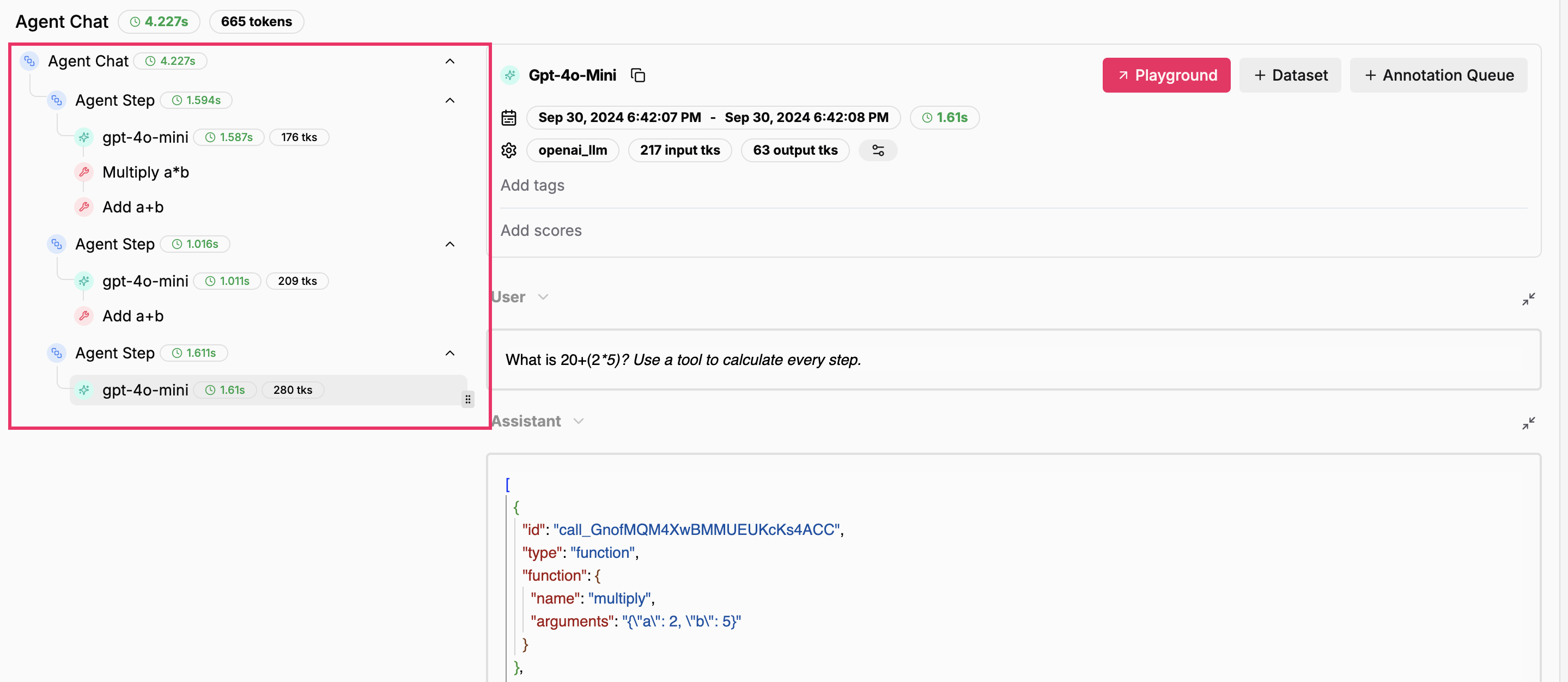 The tool calls in the stack above show only because the functions themselves are decorated with
an `@literalai_client.step(type="tool", name="My Tool")`.
The tool calls in the stack above show only because the functions themselves are decorated with
an `@literalai_client.step(type="tool", name="My Tool")`.