> ## Documentation Index
> Fetch the complete documentation index at: https://docs.literalai.com/llms.txt
> Use this file to discover all available pages before exploring further.
# Scorers
> Scorers are functions (code or LLM-as-a-judge) that take an input, output and expected output and return a score.
Scorers are the basic building blocks of evaluation.
They are used to score `Steps` or `Generations` based on a `Score Schema`.
## From the Literal AI Platform
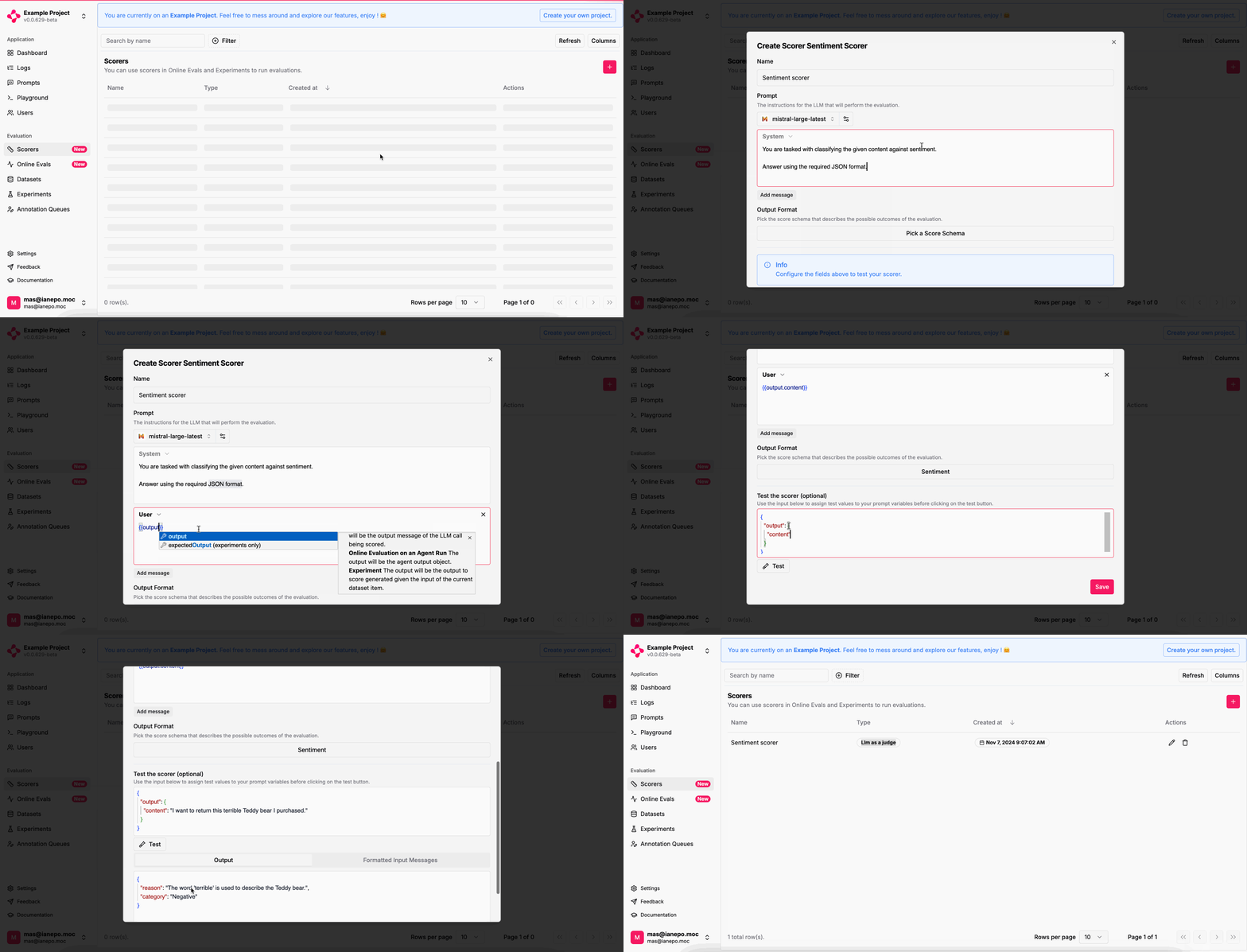
To create a scorer, go to the `Scorers` page and click on the `+` button in the upper right corner of the table.
### LLM-as-a-judge
Here's an example of the flow:
 Once you have created a scorer, your next step is to use it.
Learn how to evaluate your LLM logs in production automatically.
Learn how to run experiments from the Playground.
## From the SDKs
For custom scorers, you can leverage the Literal AI SDK to [add scores](/guides/logs#add-a-score) to your `Steps` or `Generations`.
Once you have created a scorer, your next step is to use it.
Learn how to evaluate your LLM logs in production automatically.
Learn how to run experiments from the Playground.
## From the SDKs
For custom scorers, you can leverage the Literal AI SDK to [add scores](/guides/logs#add-a-score) to your `Steps` or `Generations`.