> ## Documentation Index
> Fetch the complete documentation index at: https://docs.literalai.com/llms.txt
> Use this file to discover all available pages before exploring further.
# Online Evals
> Automatically evaluate your LLM logs in production, monitor performance and detect issues.
## From the Literal AI Platform
Automating the evaluation of your [Run outputs or LLM generations](/guides/logs#semantics) can significantly help
detect patterns and areas of improvement for your LLM app in production, especially with large volumes of data.
An **Online Eval** is composed of:
* **Name**: A name to identify the rule.
* **Log Type**: Either `Agent Run` or `LLM Generation`, it's the target to evaluate.
* **Sample Rate**: The percentage of logs to evaluate.
* **Filters**: Additional conditions to selectively evaluate certain logs.
* **Scorer**: The scorer to use for the evaluation.
To create an Online Eval, go to the `Online Evals` page and click on the `+` button in the upper right corner of the table.
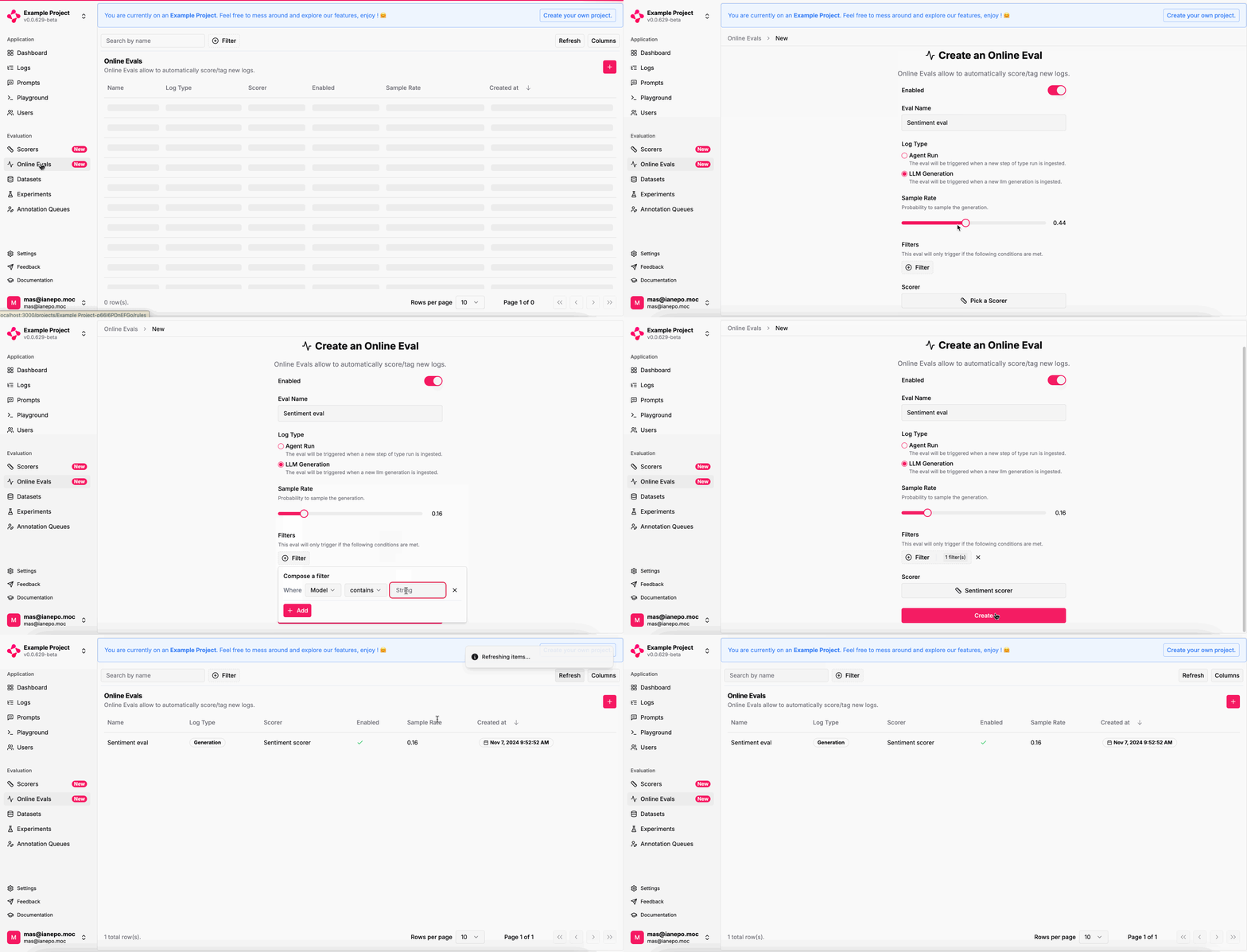 Once the Online Eval in place, your Runs or LLM Generations get automatically evaluated.
You can check the distribution of scores on an Online Eval's page:
Once the Online Eval in place, your Runs or LLM Generations get automatically evaluated.
You can check the distribution of scores on an Online Eval's page:
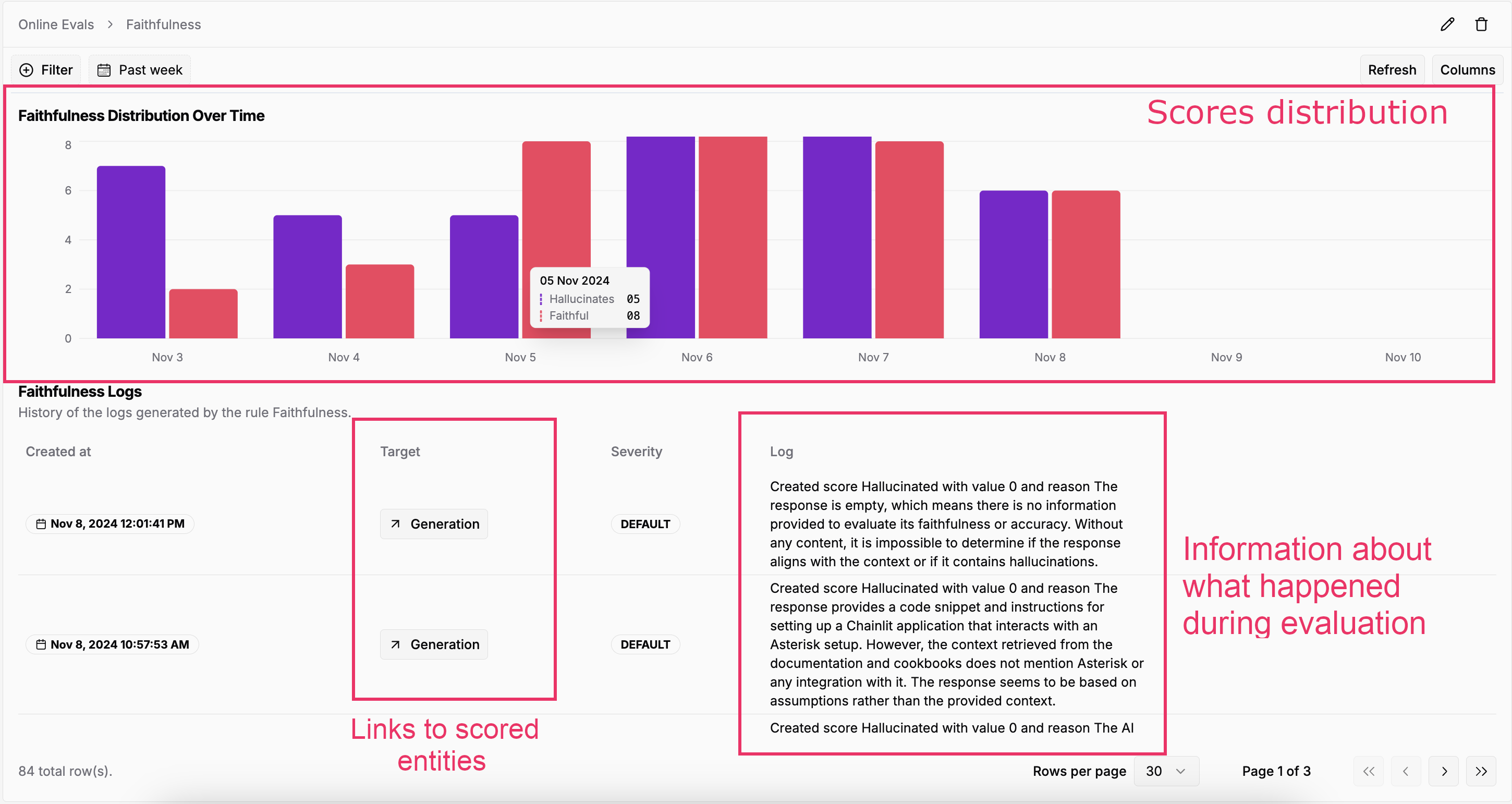 If an Online Eval failed on a Run or LLM Generation, the `Log` column will show the error message.
## From the SDKs
The SDKs provide `Score` creation APIs with all fields exposed.
If your metrics are code-based or combine LLM calls with arithmetic operations, like Ragas, you can
directly use the SDKs to create scores from your application code.
Scores must be tied either to a `Step` or a `Generation` object.\
The concept of `Score` on a `Thread` is not well-defined at this stage.
```python Python theme={null}
import os
from literalai import LiteralClient
literalai_client = LiteralClient(api_key=os.getenv("LITERAL_API_KEY"))
score = literalai_client.api.create_score(
step_id="",
name="Sentiment",
label="Positive",
type="AI",
comment="The user tipped $100, that means she is happy with the service.",
value=1.0
)
```
```typescript TypeScript theme={null}
import { LiteralClient, ChatGeneration} from "@literalai/client";
const literalAiClient = new LiteralClient(process.env["LITERAL_API_KEY"]);
const score = await literalAiClient.api.createScore({
stepId: '',
name: 'Sentiment',
label: 'Positive',
type: 'AI',
comment: 'The user tipped $100, that means she is happy with the service.',
value: 1.0,
});
```
Automation of actions based on evaluation results is coming soon!
If an Online Eval failed on a Run or LLM Generation, the `Log` column will show the error message.
## From the SDKs
The SDKs provide `Score` creation APIs with all fields exposed.
If your metrics are code-based or combine LLM calls with arithmetic operations, like Ragas, you can
directly use the SDKs to create scores from your application code.
Scores must be tied either to a `Step` or a `Generation` object.\
The concept of `Score` on a `Thread` is not well-defined at this stage.
```python Python theme={null}
import os
from literalai import LiteralClient
literalai_client = LiteralClient(api_key=os.getenv("LITERAL_API_KEY"))
score = literalai_client.api.create_score(
step_id="",
name="Sentiment",
label="Positive",
type="AI",
comment="The user tipped $100, that means she is happy with the service.",
value=1.0
)
```
```typescript TypeScript theme={null}
import { LiteralClient, ChatGeneration} from "@literalai/client";
const literalAiClient = new LiteralClient(process.env["LITERAL_API_KEY"]);
const score = await literalAiClient.api.createScore({
stepId: '',
name: 'Sentiment',
label: 'Positive',
type: 'AI',
comment: 'The user tipped $100, that means she is happy with the service.',
value: 1.0,
});
```
Automation of actions based on evaluation results is coming soon!