> ## Documentation Index
> Fetch the complete documentation index at: https://docs.literalai.com/llms.txt
> Use this file to discover all available pages before exploring further.
# Experiments
> Experiments enable continous improvement of your Prompt/Agent -- i.e. guarantee net improvements.
An experiment evaluates the performance of your **LLM system** (simple prompt or multi-step LLM chain/agent) against a **Dataset** and a set of **Evaluation Metrics**.
 ## Run Experiments from Literal AI
Run an `Experiment` on a `Prompt` against a `Dataset` and a set of `Scorers` from Literal AI.
Experiments can be run directly from the Prompt Playground. This allows you to run experiments without having to manage an infrastructure.
Go to the Prompt Playground, make modifications to your prompt and vibe-check it.
## Run Experiments from Literal AI
Run an `Experiment` on a `Prompt` against a `Dataset` and a set of `Scorers` from Literal AI.
Experiments can be run directly from the Prompt Playground. This allows you to run experiments without having to manage an infrastructure.
Go to the Prompt Playground, make modifications to your prompt and vibe-check it.
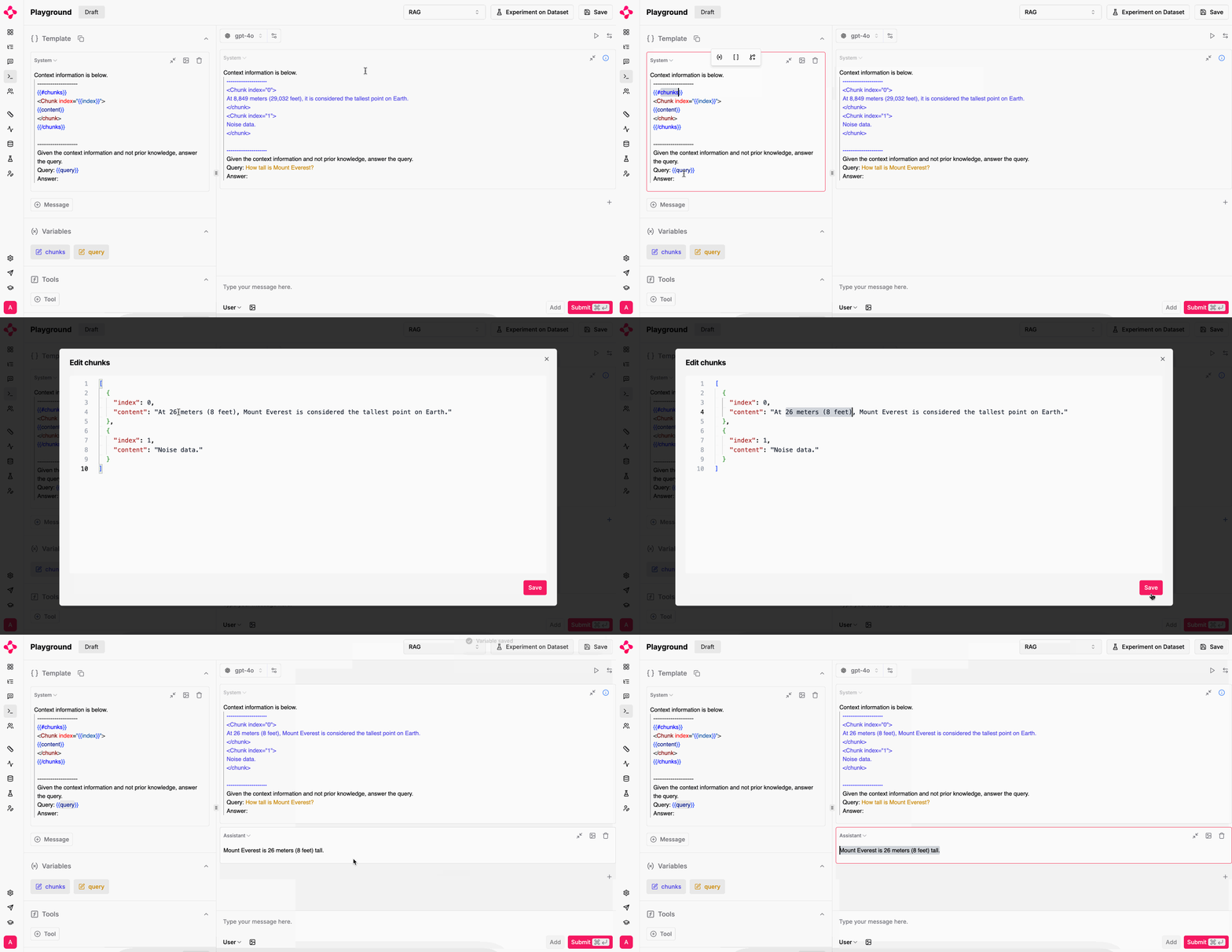 If you struggle to start, select one of our examples from the top right corner.
In the upper right corner, click "Experiment on Dataset".
If you struggle to start, select one of our examples from the top right corner.
In the upper right corner, click "Experiment on Dataset".
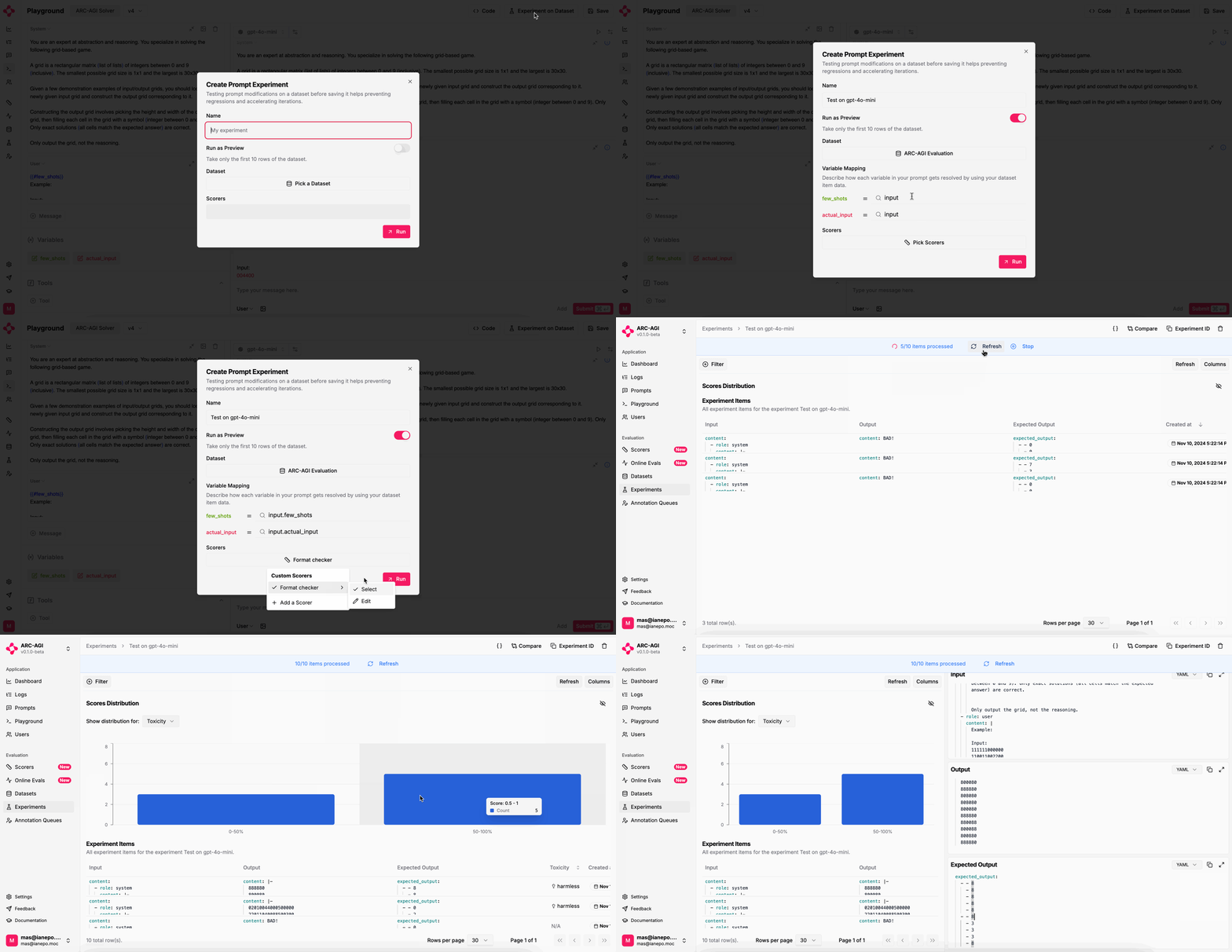 You should specify how to resolve prompt variables with your dataset `input`, `expectedOutput`
and `metadata` columns. The `Scorer` configuration offers to
use the prompt's completion through the `output` key.
Running the experiment will redirect you to the Experiment details page, where you can track progress!
More Evaluators to come soon!
## Compare experiments
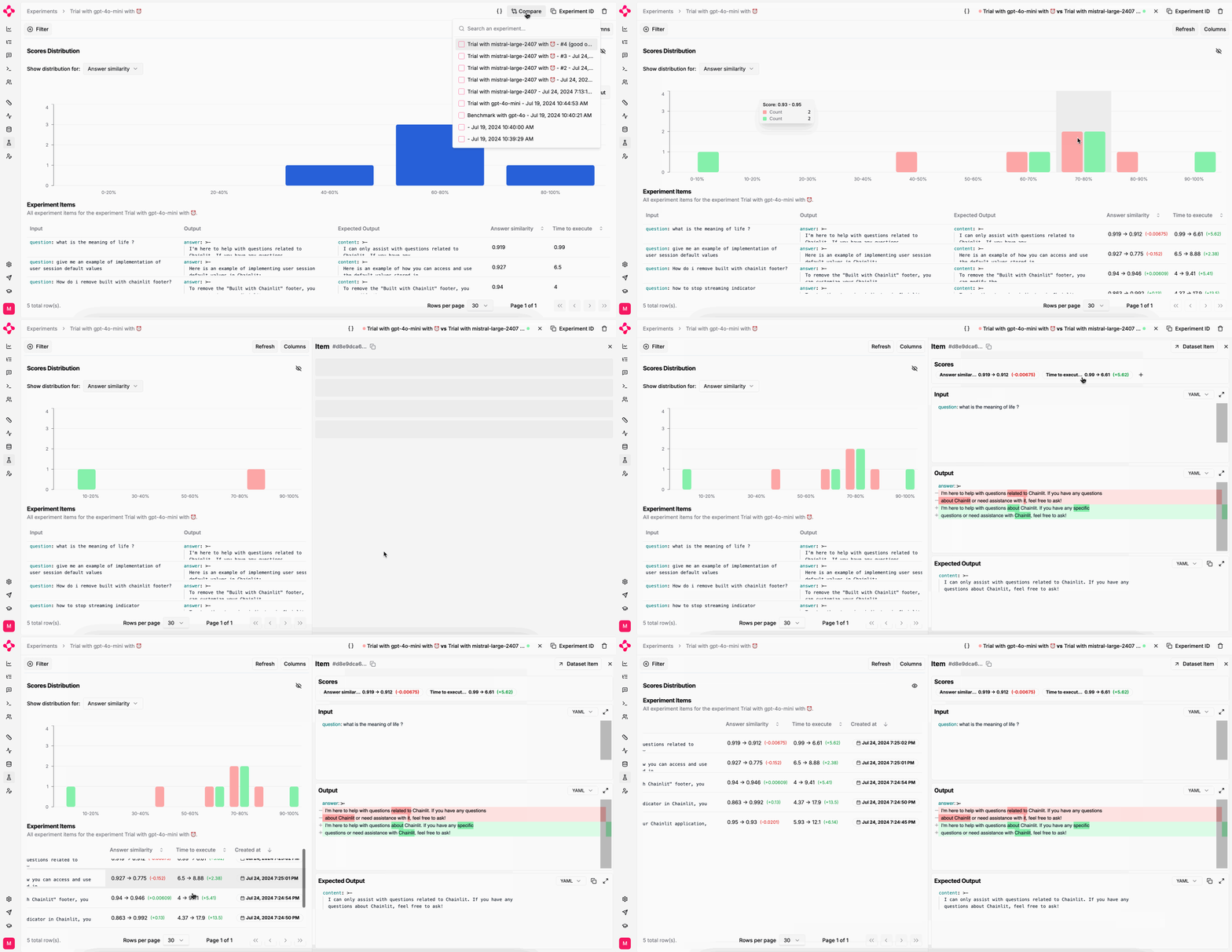
You can only compare two experiments if they were run on the same dataset.
You should specify how to resolve prompt variables with your dataset `input`, `expectedOutput`
and `metadata` columns. The `Scorer` configuration offers to
use the prompt's completion through the `output` key.
Running the experiment will redirect you to the Experiment details page, where you can track progress!
More Evaluators to come soon!
## Compare experiments
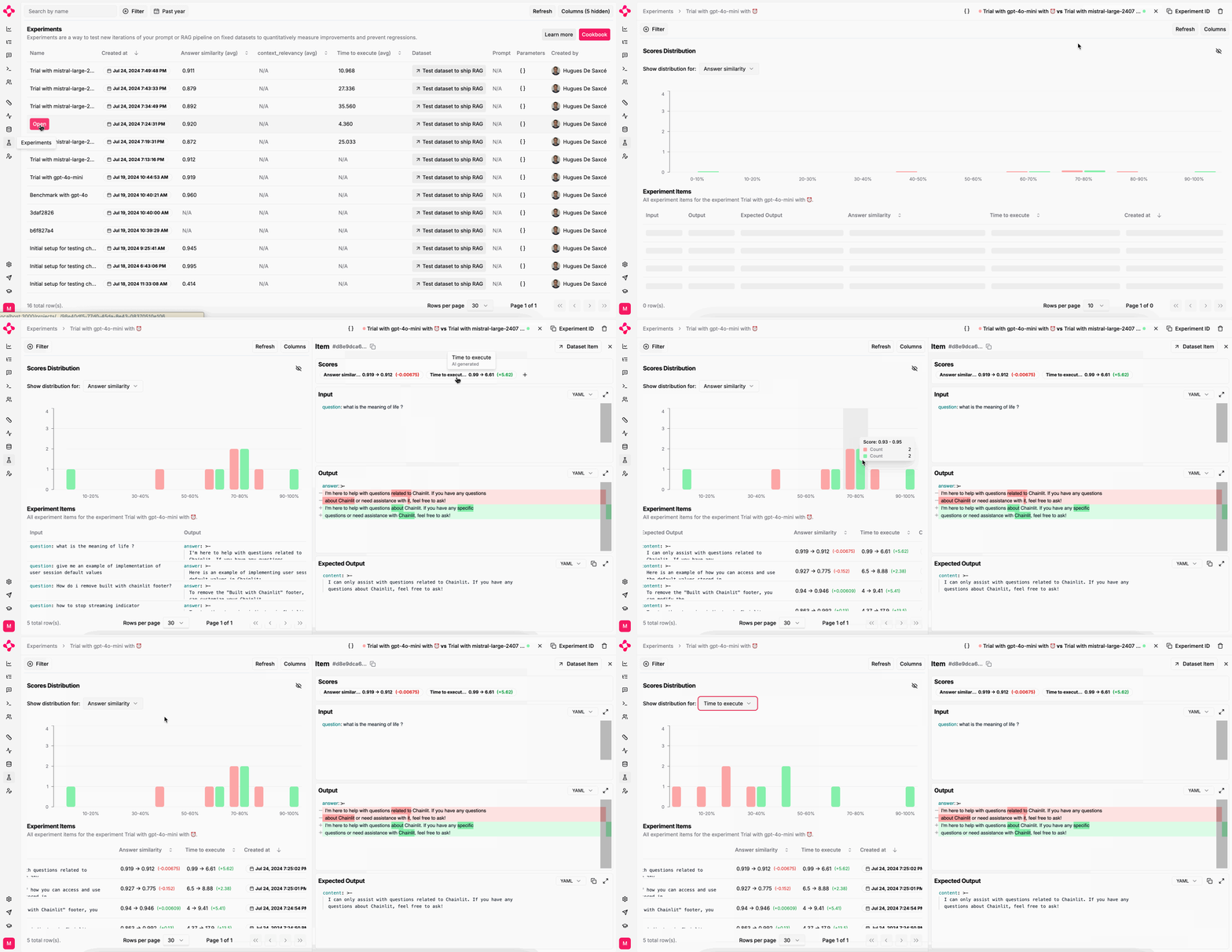
You can only compare two experiments if they were run on the same dataset.
 ## Run an experiment from your code
Complex multi-step LLM systems are heavily dependent on your code and instrastructure. Literal AI enables you to evaluate your LLM systems from your own code and then log the results on Literal AI.
Here is a naive example of how you can run an experiment with Literal AI:
See [installation](/get-started/quick-start) to get your API key and instantiate the SDK
```python Python theme={null}
inputs = [{"question": "question"}]
experiment = literalai_client.api.create_experiment(
name="Foo", params=[{"foo": "bar"}] # optional
)
@literalai_client.run
def my_agent(input):
# Faking the agent response
return {"content": "answer"}
def score_output(output):
# Faking the scoring
return [{"name": "context_relevancy", "type": "AI", "value": 0.6}]
@literalai_client.experiment_item_run
def run_and_eval(input):
output = my_agent(input)
experiment_item = {
"scores": score_output(output),
"input": input,
"output": output
}
experiment.log(experiment_item)
def run_experiment(inputs):
for input in inputs:
run_and_eval(input)
run_experiment(inputs)
```
```typescript TypeScript theme={null}
async function myAgent(input: Record) {
// This is a fake agent
return literalaiClient.step({ name: 'agent', type: 'run' }).wrap(async () => {
return { answer: 'Fake Answer' };
});
}
function scoreOutput(output: Record) {
// This is a fake scoring function
return [
{
name: 'context_relevancy',
type: 'AI' as const,
value: 0.6
}
];
}
async function main() {
const experiment = await literalaiClient.api.createExperiment({
name: 'Foo',
params: { foo: 'bar' } // optional
});
const inputs = [{ question: 'Fake question' }];
for (const input of inputs) {
await literalaiClient.experimentItemRun().wrap(async () => {
const agentOutput = await myAgent(input);
const scores = scoreOutput(agentOutput);
const experimentItem = {
scores: scores,
input: input,
output: agentOutput
};
await experiment.log(experimentItem);
});
}
}
main();
```
### Link to a Dataset
The best way to run an experiment is to use a [Dataset](/guides/dataset) to store your inputs and expected outputs. This way you can track on which data your experiment was run and compare the results of different experiments.
Using a dataset to run an experiment is very similar to the previous example, except that you are iterating over the items of the dataset:
```python Python theme={null}
dataset_id = "MY_DATASET_ID"
dataset = literalai_client.api.get_dataset(dataset_id)
experiment = literalai_client.api.create_experiment(
dataset_id=dataset_id,
name="Foo",
params=[{"foo": "bar"}] # optional
)
@literalai_client.experiment_item_run
def run_and_eval(item):
output = my_agent(item.input)
experiment_item = {
# Notice that the experiment item is now linked to the dataset item
"datasetItemId": item.id,
"scores": score_output(output),
"input": item.input,
"output": output
}
experiment.log(experiment_item)
def run_experiment():
for item in dataset.items:
run_and_eval(item)
```
```typescript TypeScript theme={null}
const datasetId = 'MY_DATASET_ID';
const dataset = await literalAiClient.api.getDataset({id: datasetId});
async function main() {
const experiment = await literalaiClient.api.createExperiment({
datasetId,
name: 'Foo',
params: { foo: 'bar' } // optional
});
for (const item of dataset.items) {
await literalaiClient.experimentItemRun().wrap(async () => {
const agentOutput = await myAgent(item.input);
const scores = scoreOutput(agentOutput);
const experimentItem = {
// Notice that the experiment item is now linked to the dataset item
datasetItemId: item.id,
scores: scores,
input: item.input,
output: agentOutput
};
await experiment.log(experimentItem);
});
}
}
```
### Link to a Prompt
If you are evaluating a prompt [living on Literal AI](/guides/prompts), you can bind it to the experiment to track the performance of the prompt.
```python Python theme={null}
prompt = literalai_client.api.get_prompt(name="MY_PROMPT", version=0)
experiment = literalai_client.api.create_experiment(
prompt_id=prompt.id,
name="Foo",
params=[{"foo": "bar"}] # optional
)
# Run the experiment the same way as before
```
```typescript TypeScript theme={null}
const promptName = 'MY_PROMPT';
const promptVersion = 0
prompt = literalAiClient.api.getPrompt(promptName, promptVersion);
async function main() {
const experiment = await literalaiClient.api.createExperiment({
promptId: prompt.id,
name: 'Foo',
params: { foo: 'bar' } // optional
});
// Run the experiment the same way as before
}
```
## Run an experiment from your code
Complex multi-step LLM systems are heavily dependent on your code and instrastructure. Literal AI enables you to evaluate your LLM systems from your own code and then log the results on Literal AI.
Here is a naive example of how you can run an experiment with Literal AI:
See [installation](/get-started/quick-start) to get your API key and instantiate the SDK
```python Python theme={null}
inputs = [{"question": "question"}]
experiment = literalai_client.api.create_experiment(
name="Foo", params=[{"foo": "bar"}] # optional
)
@literalai_client.run
def my_agent(input):
# Faking the agent response
return {"content": "answer"}
def score_output(output):
# Faking the scoring
return [{"name": "context_relevancy", "type": "AI", "value": 0.6}]
@literalai_client.experiment_item_run
def run_and_eval(input):
output = my_agent(input)
experiment_item = {
"scores": score_output(output),
"input": input,
"output": output
}
experiment.log(experiment_item)
def run_experiment(inputs):
for input in inputs:
run_and_eval(input)
run_experiment(inputs)
```
```typescript TypeScript theme={null}
async function myAgent(input: Record) {
// This is a fake agent
return literalaiClient.step({ name: 'agent', type: 'run' }).wrap(async () => {
return { answer: 'Fake Answer' };
});
}
function scoreOutput(output: Record) {
// This is a fake scoring function
return [
{
name: 'context_relevancy',
type: 'AI' as const,
value: 0.6
}
];
}
async function main() {
const experiment = await literalaiClient.api.createExperiment({
name: 'Foo',
params: { foo: 'bar' } // optional
});
const inputs = [{ question: 'Fake question' }];
for (const input of inputs) {
await literalaiClient.experimentItemRun().wrap(async () => {
const agentOutput = await myAgent(input);
const scores = scoreOutput(agentOutput);
const experimentItem = {
scores: scores,
input: input,
output: agentOutput
};
await experiment.log(experimentItem);
});
}
}
main();
```
### Link to a Dataset
The best way to run an experiment is to use a [Dataset](/guides/dataset) to store your inputs and expected outputs. This way you can track on which data your experiment was run and compare the results of different experiments.
Using a dataset to run an experiment is very similar to the previous example, except that you are iterating over the items of the dataset:
```python Python theme={null}
dataset_id = "MY_DATASET_ID"
dataset = literalai_client.api.get_dataset(dataset_id)
experiment = literalai_client.api.create_experiment(
dataset_id=dataset_id,
name="Foo",
params=[{"foo": "bar"}] # optional
)
@literalai_client.experiment_item_run
def run_and_eval(item):
output = my_agent(item.input)
experiment_item = {
# Notice that the experiment item is now linked to the dataset item
"datasetItemId": item.id,
"scores": score_output(output),
"input": item.input,
"output": output
}
experiment.log(experiment_item)
def run_experiment():
for item in dataset.items:
run_and_eval(item)
```
```typescript TypeScript theme={null}
const datasetId = 'MY_DATASET_ID';
const dataset = await literalAiClient.api.getDataset({id: datasetId});
async function main() {
const experiment = await literalaiClient.api.createExperiment({
datasetId,
name: 'Foo',
params: { foo: 'bar' } // optional
});
for (const item of dataset.items) {
await literalaiClient.experimentItemRun().wrap(async () => {
const agentOutput = await myAgent(item.input);
const scores = scoreOutput(agentOutput);
const experimentItem = {
// Notice that the experiment item is now linked to the dataset item
datasetItemId: item.id,
scores: scores,
input: item.input,
output: agentOutput
};
await experiment.log(experimentItem);
});
}
}
```
### Link to a Prompt
If you are evaluating a prompt [living on Literal AI](/guides/prompts), you can bind it to the experiment to track the performance of the prompt.
```python Python theme={null}
prompt = literalai_client.api.get_prompt(name="MY_PROMPT", version=0)
experiment = literalai_client.api.create_experiment(
prompt_id=prompt.id,
name="Foo",
params=[{"foo": "bar"}] # optional
)
# Run the experiment the same way as before
```
```typescript TypeScript theme={null}
const promptName = 'MY_PROMPT';
const promptVersion = 0
prompt = literalAiClient.api.getPrompt(promptName, promptVersion);
async function main() {
const experiment = await literalaiClient.api.createExperiment({
promptId: prompt.id,
name: 'Foo',
params: { foo: 'bar' } // optional
});
// Run the experiment the same way as before
}
```