> ## Documentation Index
> Fetch the complete documentation index at: https://docs.literalai.com/llms.txt
> Use this file to discover all available pages before exploring further.
# Datasets
> Datasets are collections of input/expected output samples for conducting experiments and non regression tests.
A Dataset is made of items. A Dataset item has an `input`, `expected output` and can contain `metadata`. The input, expected output and metadata of the items in a dataset should follow the same schema.
## Dataset Types
There are two types of datasets in Literal AI: **Key-Value** and **Generation**.
### Key-Value Datasets
Key-Value datasets can have any key-value pairs for input and expected output. This type of dataset can be used to for example store [Runs](/guides/logs#semantics) of agents. An example of a Key-Value dataset item:
```json theme={null}
input = {
"query": "Can you name a movie about space travel?"
}
expected_output = {
"response": "A movie about space travel is \"Interstellar\"."
}
```
### Generation Datasets
Generation datasets are a type of dataset that follow the OpenAI message format. An example of a Generation Dataset Item:
```json theme={null}
input = {
"messages": [{
"role": "system"
"content": "You are a helpful assistant."
}, {
"role": "user"
"content": "Can you name a movie about space travel?"
}]
}
expected_output = {
"role": "assistant",
"content": "A movie about space travel is \"Interstellar\"."
}
```
## Create a Dataset
### From File
You can upload a dataset on Literal AI from CSV (**Key-Value** datasets) or JSONL (**Generation** datasets).
To do so, go to the Datasets page and click on the `+` button to create a new dataset. Then drag and drop your file to upload it.
### From Code
You can also create a `Dataset` and populate it with items programmatically using SDKs.
See [installation](/get-started/quick-start) to get your API key and instantiate SDKs
Here is an example of how to create a dataset:
```python Python theme={null}
# create a new dataset
dataset = literalai_client.api.create_dataset(
name="Foo",
description="A dataset to store samples.",
metadata={"isDemo": True},
type="key_value" # Default type is "key_value", other is "generation"
)
```
```typescript TypeScript theme={null}
const dataset = await literalAiClient.api.createDataset({
name: 'Foo',
description: 'A dataset to store samples.',
metadata: { isDemo: true },
type: 'key_value' // other option: 'generation'
});
```
Now that we have a `Dataset`, we can create dataset items:
```python Python theme={null}
dataset_item = literalai_client.api.create_dataset_item(
dataset_id = dataset.id
input = { "content": "What is Literal AI ?" },
expected_output = { "content": "Literal AI is an observability solution." }
)
```
```typescript TypeScript theme={null}
const datasetId = dataset.id;
const item = {
input: { content: "What is Literal AI?" },
expectedOutput: { content: "Literal AI is an observability solution." },
};
const datasetItem = await literalAiClient.api.createDatasetItem(
datasetId,
item
);
```
### From existing logs
A benefit of managing your datasets and production logs in Literal AI is that you can continuously improve your app by using the logs to create new dataset items.
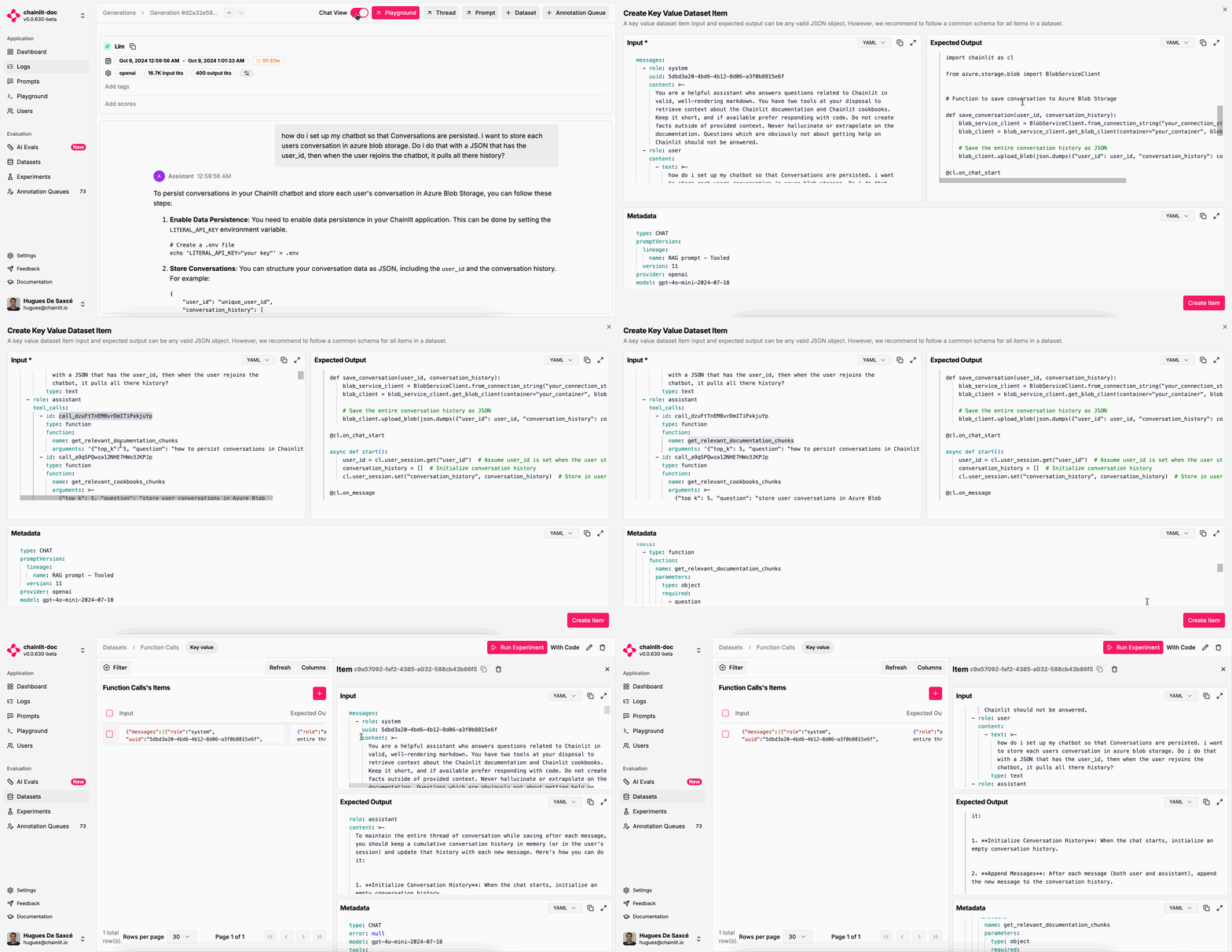 Whenever you identify a new edge case in your logs, you can create a dataset item to account for it in your experiments.
By editing the expected output to match the desired output, you ensure that your future experiments will account for this particular issue.
## Get a dataset
Once you have created a dataset, you can retrieve it using the SDK to use it in your experiments or your CI.
```python Python theme={null}
dataset = literalai_client.api.get_dataset(id=dataset.id)
for item in dataset.items:
pass
```
```typescript TypeScript theme={null}
const dataset = await literalAiClient.api.getDataset({id: dataset.id});
dataset?.items.forEach((item) => {
console.log(item.id)
});
```
Whenever you identify a new edge case in your logs, you can create a dataset item to account for it in your experiments.
By editing the expected output to match the desired output, you ensure that your future experiments will account for this particular issue.
## Get a dataset
Once you have created a dataset, you can retrieve it using the SDK to use it in your experiments or your CI.
```python Python theme={null}
dataset = literalai_client.api.get_dataset(id=dataset.id)
for item in dataset.items:
pass
```
```typescript TypeScript theme={null}
const dataset = await literalAiClient.api.getDataset({id: dataset.id});
dataset?.items.forEach((item) => {
console.log(item.id)
});
```