> ## Documentation Index
> Fetch the complete documentation index at: https://docs.literalai.com/llms.txt
> Use this file to discover all available pages before exploring further.
# Dashboard
> Monitor your AI application usage, and track performance and reliability.
# Monitoring Your AI Application
Effective monitoring is crucial for maintaining and optimizing your AI application.
This guide will walk you through the key aspects of monitoring, including using the dashboard, understanding important metrics, and accessing logs.
Monitoring is closely related to [evaluation](/guides/online-evals) and [continuous improvement](/guides/continuous-improvement).
## Dashboard Overview
The dashboard provides a comprehensive view of your AI application's performance and usage.
 Each card can be filtered.
### Volume Metrics
Track the usage and activity of your AI application over time:
* Number of conversation threads
* Agent runs
* Text generations
* Token usage
* User feedback submissions
### Latency Metrics
Monitor the speed and responsiveness of your AI:
* Time to first token: How quickly your AI starts generating a response
* Token throughput: The rate at which tokens are generated
### AI Performance Evaluations
Each card can be filtered.
### Volume Metrics
Track the usage and activity of your AI application over time:
* Number of conversation threads
* Agent runs
* Text generations
* Token usage
* User feedback submissions
### Latency Metrics
Monitor the speed and responsiveness of your AI:
* Time to first token: How quickly your AI starts generating a response
* Token throughput: The rate at which tokens are generated
### AI Performance Evaluations
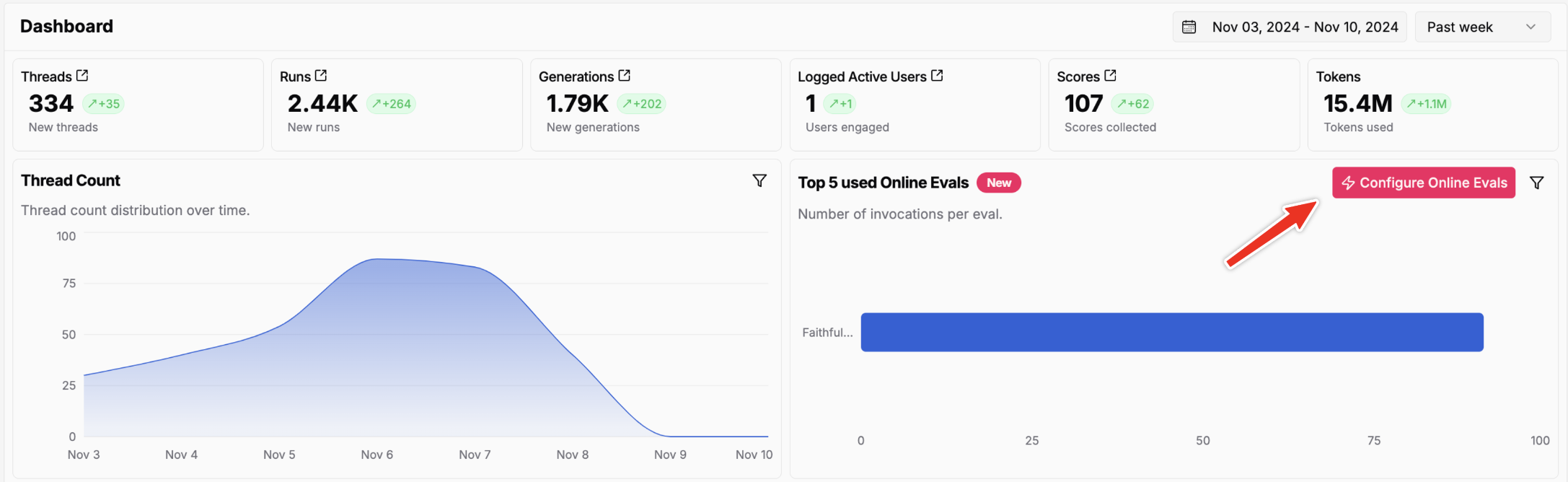 Evaluate the quality and effectiveness of your AI:
* Set up AI evaluations in production to continuously monitor performance
* For detailed information on setting up evaluations, refer to our [evaluation guide](/guides/scorers)
### LLM Cost Metrics
Track the cost of your LLM Provider APIs over time.
Setup cost tracking for your LLM Provider APIs.
## Accessing Logs
Detailed [logs](/guides/logs) provide valuable insights for troubleshooting and optimization:
1. In the sidebar, navigate to the "Logs" section
2. Use filters to narrow down logs by date, conversation ID, or AI eval results
3. Review log entries for specific conversations or errors to identify root causes
Evaluate the quality and effectiveness of your AI:
* Set up AI evaluations in production to continuously monitor performance
* For detailed information on setting up evaluations, refer to our [evaluation guide](/guides/scorers)
### LLM Cost Metrics
Track the cost of your LLM Provider APIs over time.
Setup cost tracking for your LLM Provider APIs.
## Accessing Logs
Detailed [logs](/guides/logs) provide valuable insights for troubleshooting and optimization:
1. In the sidebar, navigate to the "Logs" section
2. Use filters to narrow down logs by date, conversation ID, or AI eval results
3. Review log entries for specific conversations or errors to identify root causes