> ## Documentation Index
> Fetch the complete documentation index at: https://docs.literalai.com/llms.txt
> Use this file to discover all available pages before exploring further.
# Quick Start
> Install the Literal AI client and get your API key
Install the Literal AI SDK and get your API key.
Create, version and A/B test your prompts in the Prompt Playground.
## Logging LLM Generations, Agent Runs or Conversation Threads
```shell Python theme={null}
pip install literalai
```
```shell TypeScript theme={null}
npm i @literalai/client
```
```python Python theme={null}
import os
from literalai import LiteralClient
# Not compatible with gunicorn's --preload flag
literalai_client = LiteralClient(api_key=os.getenv("LITERAL_API_KEY")) # This is the default and can be omitted
```
```typescript TypeScript theme={null}
import { LiteralClient } from '@literalai/client';
const literalAiClient = new LiteralClient({apiKey: process.env["LITERAL_API_KEY"]}); // This is the default and can be omitted
```
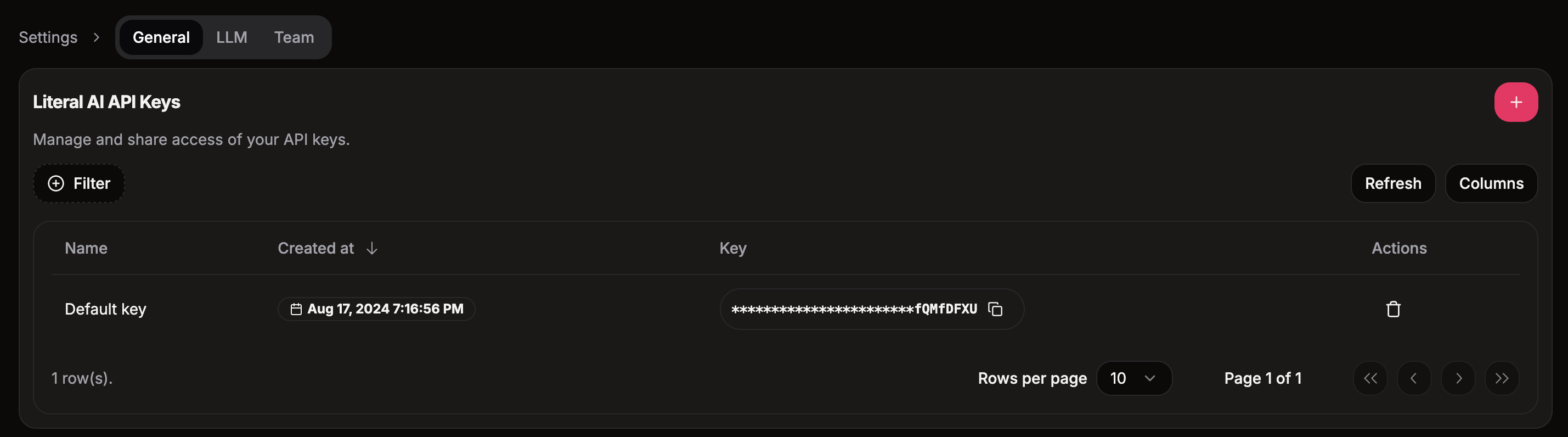
Go to your [project page](https://cloud.getliteral.ai) and click on the **Settings** tab. You will find your API key in the **API Key** section.
 ## Start logging LLM generations and agent runs
Literal AI provides
1. low-level SDKs in Python and TypeScript
2. integrations with LLM providers (OpenAI, etc.) and AI frameworks (LangChain, LlamaIndex, Vercel AI SDK, etc.)
Learn how to instrument your code with the Literal AI SDK.
Browse the list of integrations available with Literal AI.
## Start logging LLM generations and agent runs
Literal AI provides
1. low-level SDKs in Python and TypeScript
2. integrations with LLM providers (OpenAI, etc.) and AI frameworks (LangChain, LlamaIndex, Vercel AI SDK, etc.)
Learn how to instrument your code with the Literal AI SDK.
Browse the list of integrations available with Literal AI.